Online Help
Wall Options
Use the following options to set the properties of wall segments in the sidebar:
Hot Keys
| Change values | |
| Ctrl | Large steps (ex. 5cm) |
 |
|
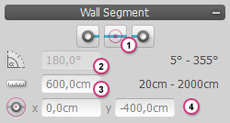
| 1 | Chooses wall points or a wall segment for adjustment |
| 2 | Angle of wall points or wall segments |
| 3 | Length of wall segment |
| 4 | Center of wall points or the wall in the drawing area |
 |
|
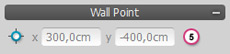
| 5 | Position of wall points in the drawing area |